Do you struggle with Wi-Fi dead zones in your home? The placement of your router can significantly impact your network’s performance. Understanding the basic principles of radio wave interference and obstructions can help you identify if your router is in the wrong room. This guide will explain why certain locations are problematic for Wi-Fi signals and provide strategies to fix common issues. Discover how to optimize your router placement to eliminate dead zones and ensure reliable connectivity throughout your home.
Radio Wave Interference and Room Placement: Optimizing Your Wi-Fi Network
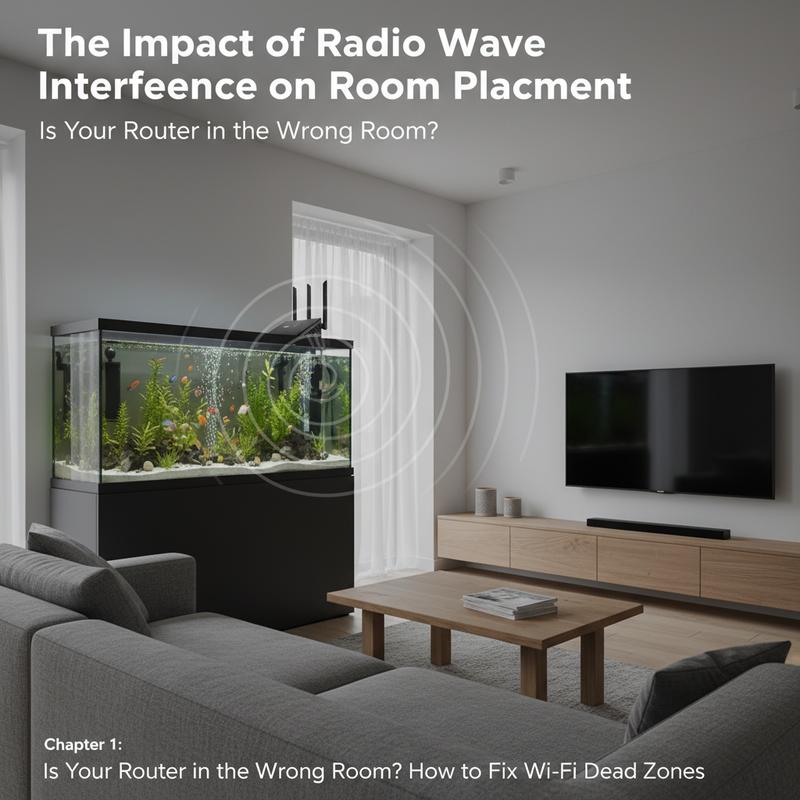
Understanding the subtleties of radio wave interference and the physical layout of your home is crucial for optimizing Wi-Fi performance. Wi-Fi signals, which are essentially radio waves, are finicky in nature. They have a penchant for traveling in straight lines and can be easily obstructed, absorbed, or reflected by a variety of household materials. This makes the placement of your router within the home far more important than one might initially think.
Placing your router in the wrong room can severely impact your network’s coverage and speed. Thick walls, especially those made of metal, concrete, or brick, can diminish your Wi-Fi signal by a staggering 30% to 90%, based on their density and composition. If your router is tucked away behind such barriers—perhaps hidden in a corner, closet, or behind bulky furniture—you are likely sabotaging its effective range, creating those dreaded dead zones where signal is weak or nonexistent.
Kitchens are especially problematic locations for routers due to the high concentration of metal appliances. Devices like microwaves emit their own electromagnetic waves, which can severely disrupt your Wi-Fi signals—sometimes reducing router efficiency by up to 90% at close range. Furthermore, other electronic devices around the home, including cordless phones, Bluetooth speakers, and baby monitors, can also interfere, particularly on the 2.4 GHz band, which is more prone to disruption.
Optimal router placement involves more than just avoiding certain rooms or materials; it is about finding the sweet spot that provides the best coverage. Routers emit signals in a roughly spherical pattern, tending to spread more downward than upward. Hence, elevating the router by placing it on a shelf or mounting it on a wall can enhance coverage. Centralizing the router in an open area ensures minimal obstacle interference, extending its broadcast reach to the farthest corners of your home.
Adopting the right frequency band can also play a significant role. While 2.4 GHz signals have a greater capability of penetrating walls, they are vulnerable to interference. On the other hand, 5 GHz signals offer faster speeds with a clearer path but are easily blocked by obstacles. The strategic use of these bands, depending on your home’s layout, can markedly improve performance.
If you realize your router is languishing in a corner, encased behind thick walls, or nestled among substantial obstructions, it’s time to reconsider its placement. Moving your router to a location that is central, elevated, and devoid of interference is one of the most straightforward yet effective ways to bolster your home network performance. Keep it away from sources of interference and obstructions for optimal results. For further tips on enhancing your connectivity and addressing common tech issues, consider visiting our Internet Troubleshooting Guide.
Decoding Wi-Fi Dead Zones: Strategies to Resolve Home Signal Blackouts
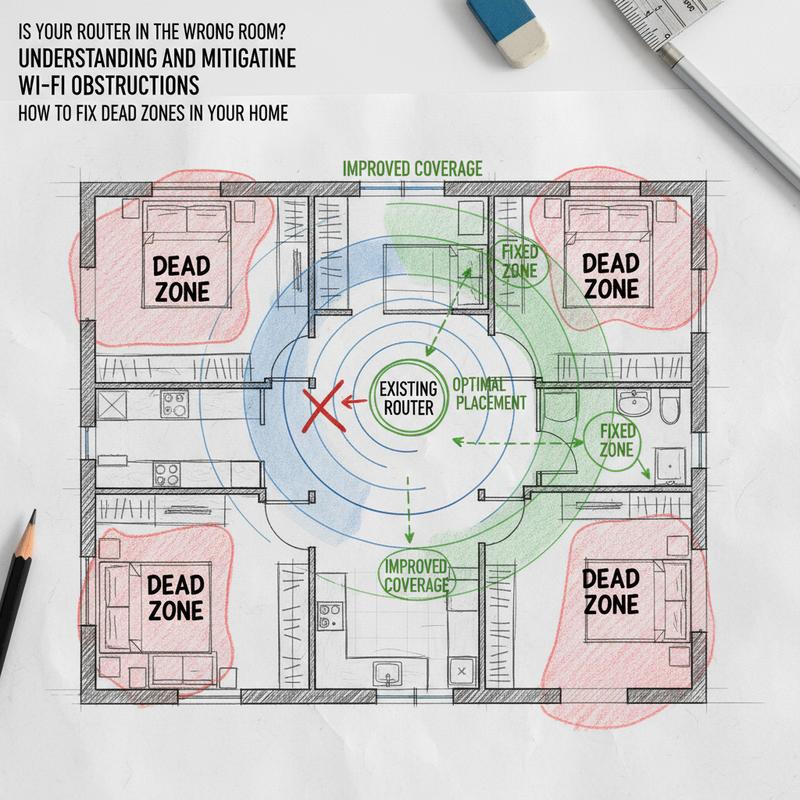
In modern households, Wi-Fi has become as essential as electricity and plumbing. Yet, we often find ourselves grappling with infuriating dead zones, those black holes where signals vanish, leaving our devices helpless. Understanding these zones begins with recognizing the inherent nature of Wi-Fi signals and their interactions with your home’s environment.
Wi-Fi signals are electromagnetic waves, akin to radio signals, oscillating in predictable patterns through space. The problem arises when these waves encounter obstacles, which can be anything from your home’s architectural materials to the gadgets and furniture filling its spaces. Dense materials like brick, concrete, and metal act as formidable barriers that either absorb or reflect these signals, weakening them or bouncing them back in unpredictable directions. Even simple everyday items like mirrors, furniture, and large appliances can scatter these waves, reducing their efficacy.
Distance plays a crucial role as well. Just like light from a bulb dims as you move away, Wi-Fi signals fade over distance. If several walls or floors stand between your device and the router, expect diminished connectivity. But it’s not just physical barriers; everyday household electronics can interfere with Wi-Fi, particularly if they share frequencies. Microwaves, cordless phones, and Bluetooth devices operate on similar bands, often leading to signal disruptions.
So how can we fight back against these invisible adversaries? The key lies in strategic router placement. Think of your router as a lighthouse; the broader and clearer its sightlines, the more effectively it can illuminate your home with connectivity. Position it centrally and elevated, minimizing blockages both lateral and vertical. Ideally, the router should inhabit open, clutter-free spaces away from dense materials and electronic buzz.
Updating your router’s firmware is another essential step often overlooked. Manufacturers routinely release updates to fix bugs and optimize performance, which could alleviate some connectivity issues. Additionally, if your router has adjustable antennas, point them vertically to enhance horizontal coverage.
For those in densely populated areas, changing your Wi-Fi channel can also reduce interference. Channels 1, 6, and 11 on the 2.4 GHz band tend to be less crowded and can significantly enhance your network performance. When these measures fall short in covering sprawling homes, technology lends a hand with solutions like Wi-Fi extenders or mesh systems. These devices extend or amplify your network’s reach, ensuring even the most remote corners of your residence remain connected.
Another useful strategy is conducting a site survey using Wi-Fi analyzer apps, mapping the signal strength throughout your residence to precisely locate weak spots. This data empowers you to make informed decisions about where to place extenders or whether intervention from professional services might be necessary.
Finally, practice device management by limiting the clutter on your network. Disconnecting unused devices or opting for wired connections for stationary equipment can free up bandwidth, boosting performance for your actively-used devices. Explore more tips for improving your home’s tech environment.
Addressing these factors systematically will help you conquer Wi-Fi dead zones, transforming your home into a seamless, well-connected haven of digital convenience.
Strategic Router Placement: Maximizing Wi-Fi Efficiency Beyond Closets and Aquariums

Optimizing the placement of your Wi-Fi router is more than just a matter of aesthetics or convenience; it’s a crucial step in ensuring robust and reliable internet connectivity throughout your space. Contrary to common tendencies to hide routers away in closets or behind aquariums, strategic placement is key to overcoming Wi-Fi dead zones.
The first principle in router placement is recognizing the impact of various materials on radio wave propagation. Wi-Fi signals, which are essentially radio waves, travel most effectively in straight paths and are susceptible to being absorbed or reflected by nearby objects. Placing your router inside closets or cabinets—which many people might consider to keep their living spaces tidy—effectively blocks radio waves. Made from materials like wood or metal, these enclosures absorb or deflect signals, leading to diminished performance despite the capabilities of even the most advanced routers.
Even more detrimental to Wi-Fi signals is positioning your router near an aquarium. Water is an excellent absorber of radio waves, particularly at the frequencies used by Wi-Fi networks (2.4 GHz and 5 GHz). Thus, any attempt to place your router behind or alongside an aquarium can severely limit signal strength, leaving vast areas of your home in digital silence.
Rather than sequestering your router in enclosed spaces or behind large, obstructive objects, it’s best to place it in a central, open location. This method ensures a balanced distribution of Wi-Fi coverage across all areas. Ideally, the router should be elevated, perhaps on a shelf or desk, to further maximize its reach and avoid interference from furniture and appliances. Elevating the router enables the signals to travel more freely, minimizing the risk of encountering obstacles that may degrade performance.
An open area not only avoids signal blockage but also reduces interference from surrounding electronic devices, such as microwaves and TVs, which can cause disruptive signal noise. By maintaining a clear line of sight from the router to the devices it serves, you enhance both the strength and reliability of your network connection.
For those residing in larger homes or buildings with multiple thick walls, investing in a mesh Wi-Fi system offers another layer of coverage. These systems distribute the Wi-Fi signal through various nodes strategically placed to ensure comprehensive connectivity, even in the most isolated areas. Careful consideration should be taken to position these nodes where the signal is already strong to extend the reach effectively, rather than placing them in areas already plagued by dead zones.
Adhering to these placement strategies empowers you to maintain a seamless and efficient network. For those seeking additional tips on enhancing their home’s technological setup, you might find the Tech Support for Home section insightful for further guidance.
Final thoughts
Strategic router placement is key to ensuring strong and reliable Wi-Fi throughout your home. By understanding how radio waves interact with their surroundings, you can avoid common pitfalls such as placing routers in closets or near water and metal surfaces. By positioning your router centrally and elevated, and by addressing specific layout challenges with extenders or mesh systems, you empower yourself with the best chances of seamless connectivity. Take control of your network coverage and banish Wi-Fi dead zones for good.
Struggling with dead zones or slow Wi-Fi? Let IT Carolina optimize your home network and bring strong, reliable coverage to every corner of your space.
Learn more: https://itcarolina.com/about/
About us
IT Carolina specializes in diagnosing and eliminating Wi-Fi dead zones by applying advanced network optimization and placement strategies. Whether your signal is blocked by walls, hidden behind an aquarium, or muffled in a closet, our experts use deep knowledge of radio wave behavior to ensure your router is positioned for maximum efficiency. From gamers craving lag-free multiplayer sessions to families streaming content across multiple devices, we make sure your network keeps up with your lifestyle. With IT Carolina, say goodbye to buffering and hello to seamless connectivity throughout your home.